 Simple Flight Suite
 Simple Flight Menus
Faster, cleaner. The menus you use every flight, made simple.
Thank-you gift Windows app + an MSFS add-on. A thank-you gift for anyone who supports my work.
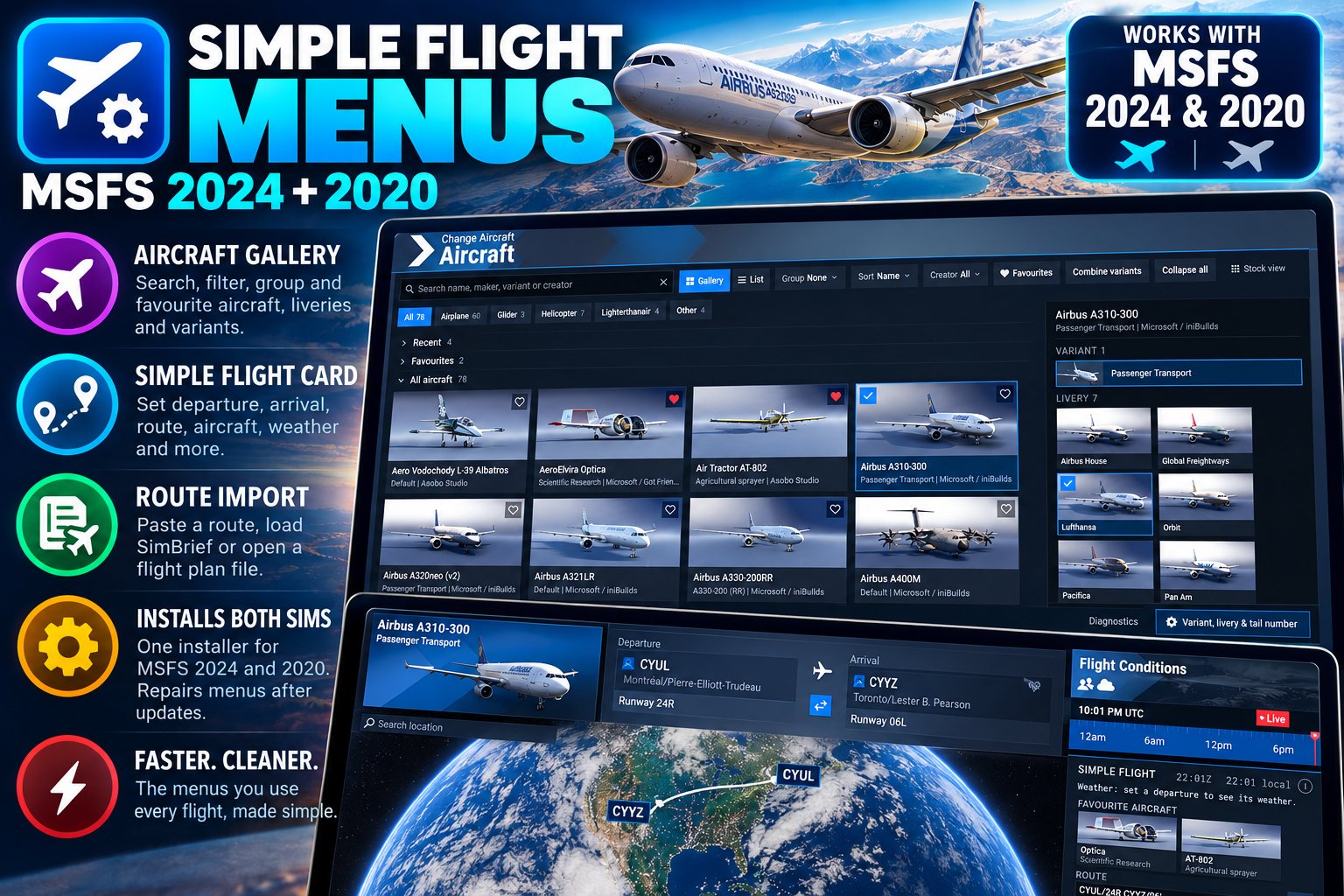
Simple Flight Menus replaces the parts of the MSFS menus you use on every flight with something faster and easier to find your way around.
The stock menus stay underneath and you can switch back to the stock view at any time. It works in MSFS 2024 and MSFS 2020, and one installer handles both.
The Aircraft Gallery
- Search properlyBy name, maker, livery or creator.
- Sort, group and filterSort by name, maker or recently flown, group by maker, and filter by type — airliner, propeller, turboprop, jet, helicopter, glider.
- Favourites and recently flown stay on topAnd stay visible whatever filter is on.
- Collapsible sectionsPlus Collapse all, for when the list has grown.
- A livery panelEvery livery of the selected aircraft, with its tail number.
- More in 2024Variants in the side panel, your own groups, and a gallery or list view. When a livery's files include a registration, the tail number fills in automatically.
The Simple Flight Card
- Where it appearsFree Flight in 2024, the World Map in 2020.
- Clock and weatherUTC and local time, and the weather at your departure airport.
- Route importPaste a route like CYUL/24R CYYZ/06L, load your latest SimBrief plan, or open a .pln or .fms file in the app. The airports and runways are set for you.
- Favourite airportsWith one-click Departure or Arrival.
- Flight presetsSave airports, runways, aircraft, livery, time and weather, and bring them all back in one click.
- More in 2024Favourite aircraft one click away on the card.
The App That Installs It
- It finds your simsMicrosoft Store, Xbox or Steam, 2024 and 2020, and installs the menus into each Community folder.
- Built from your own filesThe menus are built from your sim's own files, so they match your sim version.
- Repair after a sim updateIt shows Repair now when an update breaks things, and can check and repair automatically when you sign in to Windows.
- Polite about other modsIf another mod replaces the same menu file — SimpleUI in 2024, World Map mods in 2020 — it moves that mod to a Community-SetAside folder. Nothing is deleted, and uninstalling puts it back.
- No admin rights neededA normal install.
Getting It Running
MSFS 2024 and/or MSFS 2020, Windows 10 or 11, and the .NET 8 Desktop Runtime, which is free from Microsoft. Run the installer, then in the app pick your sim from the list and press Install with the sim closed — once for each sim you have. Start the sim and open Free Flight in 2024 or the World Map in 2020, and the card confirms it is running.
On This Page
Works With
- Simple Flight Planner
Export a plan from the planner and open the .pln straight from the menu.
- Simple Profile Manager
Pair a settings profile with the menu presets for a complete setup.
- Simple Dispatch
Dispatch turns on the add-ons; Menus is where you pick the aircraft and route.
Simple Flight Planner, Simple Flight Tracker, Simple Settings Sheet, Simple Flight Academy, Simple Traffic Compiler and Simple Flight Traffic are free to everyone. The rest, this one included, are what I send back to people who support my work — all of them, together.