 Simple Flight Suite
 Simple Flight Remote
Your moving map. Now with navaids, fixes and more.
Thank-you gift Windows app + your phone or tablet. A thank-you gift for anyone who supports my work.
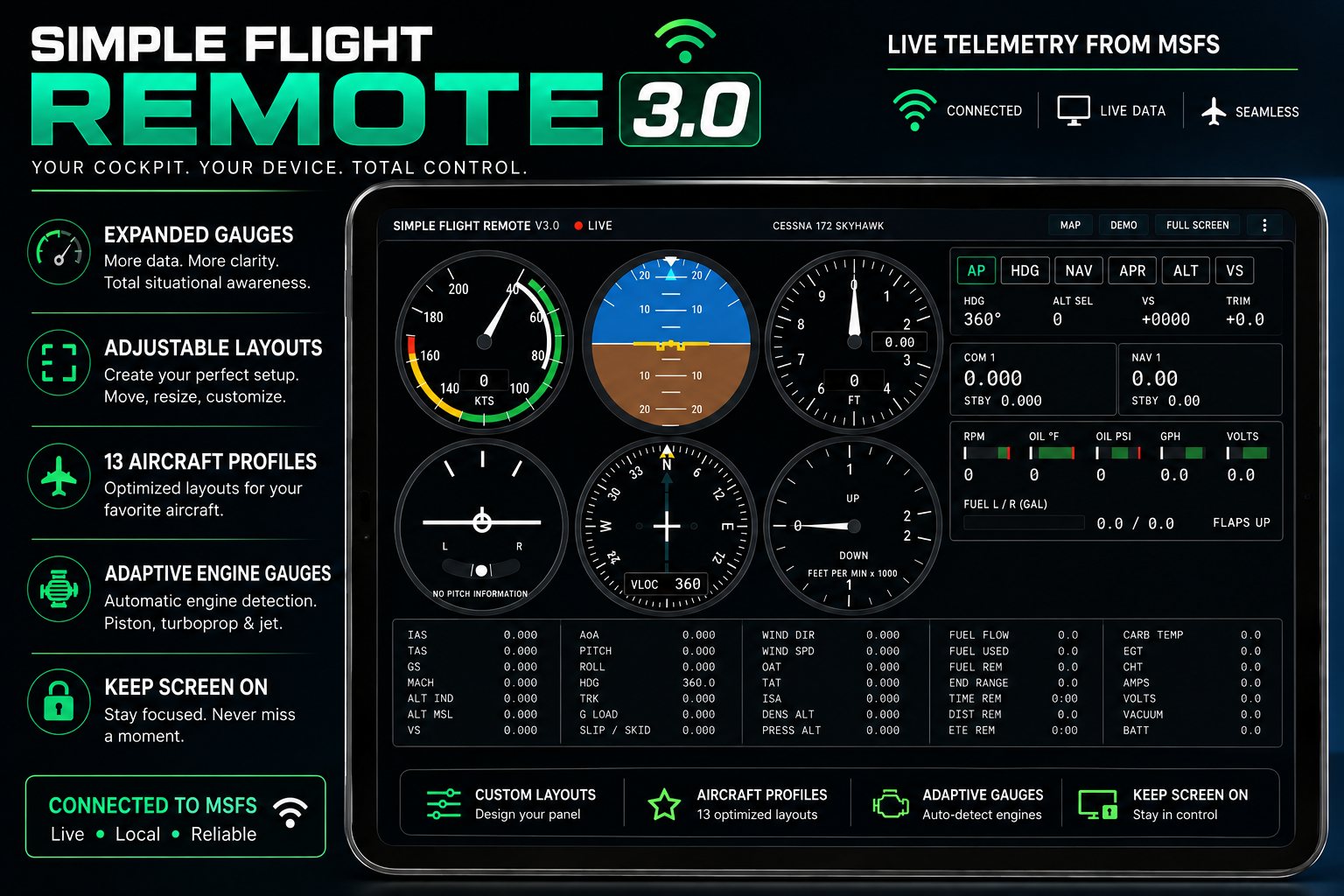
A small program runs on your sim PC. Open a web page on your phone or tablet and you have a live moving map, a full instrument panel, working autopilot and radio controls, and a radio that answers you.
New in 4.0: the chart. The moving map now draws the navigation aids and waypoints you are actually flying between — VORs, NDBs, localizers and enroute fixes, with the symbols a chart uses — read out of the simulator's own database rather than downloaded separately. Tune 117.50 because the map says so and the needle comes alive.
Also here: the aircraft's own checklist, laid out by phase and ticked off as you go, and the glass panel — any display the simulator can pop out, on your tablet, with a working bezel around it.
Tap LAYERS, RADIO, GLASS or CHECK on the map. That is the whole setup on the tablet.
All of it runs on your own PC over your own Wi-Fi. No account, no cloud, nothing uploaded.
New in 4.0: the Chart
- Chart symbols, not dotsVORs as hexagons, boxed when there is DME alongside. A ring of dots for an NDB, a diamond for a localizer, a small triangle for a fix. Tap LAYERS to switch them on.
- From the simulator, not from a chartEvery other moving map downloads its own navigation data, which means the map can disagree with the aeroplane. These come out of the simulator's own database — the same one the NAV radio tunes and the GPS flies. If your AIRAC is old, the map is old in exactly the same way the aircraft is, which is the behaviour you want.
- Frequencies read, not assumed113.55 for a VOR, 341 for an NDB, taken from the simulator. A frequency outside its band is shown as absent rather than as a number you might try to tune, because navdata does occasionally come through corrupted and a wrong frequency is worse than a missing one.
- And names, close inThe simulator supplies an identifier and nothing else, so the map would read SYI where a chart reads Shelbyville. Names come from OurAirports, matched by identifier and position because the same three letters are used in several countries.
- Localizer feathersThe long narrow wedge pointing back down the approach path, drawn at the published course converted from magnetic to true so it lies on the map where it lies on the ground. Like a chart's, it is wider than the real beam: it shows where the approach is, not how wide the signal is.
- It stays readableOver empty country there are a dozen fixes in view; over Memphis there are five hundred and seventy-six. A zoom threshold cannot fix that, because density belongs to the place rather than the scale, so there is a ceiling on how much is drawn and what survives is whatever is nearest the middle of the screen.
- And it says what it droppedThe layers menu reads "showing 33 navaids and the 60 nearest of 558 fixes" rather than quietly leaving things out.
- Three more things keep it quietFix names arrive one zoom level after the triangles, because the symbols are cheap and the words are what crowd a map. Localizers stay hidden until you are near a field. And anything carrying a digit is hidden unless you ask, since a published fix is five letters and the rest are reference points.
- The scale bar shows the zoom levelSo "am I zoomed in far enough for that yet" is a question you can answer by looking.
The Nearby List
- Everything in range, nearest firstIdentifier, name, type, frequency, bearing and distance. Tap LAYERS, then Nearby list. Tap an entry to centre the map on it.
- Because a map alone cannot do itA diversion is judged at a scale showing eighty miles across, and at that scale every fix is an unlabelled triangle — you can see that options exist and you cannot read one.
- It works at any zoomAnd it gives you the identifier rather than a shape, which is what you type into an EFB or a flight computer.
Two Menus Instead of Eleven Buttons
- LAYERSWhat the map draws: traffic, navaids, fixes and the nearby list. Each switch cycles through its settings and the menu stays open, so you can set all three in one go.
- It says why a layer is emptyWaiting for the simulator, nothing in range, or not zoomed in far enough yet — with the number you need.
- RADIOThe three radio pages together: weather and ATIS, CTAF, and tower. Clearance, ground and tower were always one conversation across several frequencies, and three separate buttons said otherwise.
The Aircraft's Own Checklist
- Not a checklist someone typed upEvery MSFS aircraft that has a checklist ships it as a file in the aircraft's folder — the same list the sim's own checklist panel uses. Remote reads the file for whatever you are flying.
- Laid out by phasePreflight, taxi, runway, takeoff, cruise, descent, approach, landing, after landing, shutdown. A button at the bottom moves on to the next phase.
- Tap as you goAn item you tap is ticked off, and the next one waits with a yellow outline.
- It keeps your placeTicks are kept on the tablet for that aircraft, so you can put it down mid-flight and pick up where you were. Reset clears them for the next flight.
- It follows the aircraftChange aircraft in the sim and the page changes with it.
- Fine on a phoneUnlike the glass panel, the checklist does not need a tablet.
- It only readsNothing on the checklist page changes anything in the sim.
The Glass Panel
- The simulator's own displayNot a redraw. In the sim, hold Right Alt and click the PFD; it pops out into its own window and a moment later it is on the tablet. Whatever the G1000 in your aircraft can do, it does on the tablet, because there is nothing for Remote to keep up with.
- Any pop-out, not just the G1000Any display the simulator can pop out shows on the tablet.
- Touch screensAnything that is not a G1000 comes without the bezel, the picture filling the tablet, and you work it by touching the picture — tap a button, slide a finger to scroll. That includes the G3000's touch controller, the screen between the seats that runs the whole system in the real aircraft.
- Pop-outs out of the wayA pop-out cannot be pushed behind the sim — Windows always keeps it in front — so Remote moves it just past the edge of the screen instead. The sim keeps drawing it, the tablet keeps showing it, and your screen is clear for the view outside. The windows come back when the last tablet disconnects, and SETUP can turn this off if you would rather keep them on a second monitor.
- A smooth pictureRemote now takes the next picture while the last one is still being sent, so the two halves of the work overlap instead of queuing. The frame-rate setting goes up to 40.
- You can see what is limiting itThe line at the top shows the rate actually reached, how much of each frame had changed, and how long the capture and the encoding took — so if the display is not as smooth as you asked for, you can see which side is the limit.
- It finds the window itselfAnd resizes it, because a freshly popped-out display is small enough to look blurry stretched across a tablet. Close the window and the tablet waits; pop it out again and the picture comes back on its own.
- One tablet eachA list at the top chooses which display a tablet shows, and each tablet remembers its own choice: PFD on one, MFD or the touch controller on another.
- Twelve working softkeysLined up under their labels. Press the key or tap the label, whichever your thumb reaches for.
- Knobs you turnPut a finger on a knob and drag round in a circle, one click per step. The large knobs have two rings like the real ones: outer for megahertz, inner for kilohertz, tap the inner to push it. NAV, COM, heading, altitude, baro, course, range and FMS are all there.
- The map pointerTap the range knob to switch it on, then hold an arrow to move it. Holding repeats, so you can cross the map without forty taps.
- And the rest of the bezelAutopilot keys, the menu keys, direct-to, flight plan, procedures, clear and enter. Hold COM swap for a second and a half and it sets 121.5.
What the Glass Panel Needs
- The MobiFlight WASM moduleSoftkeys and most knobs are not ordinary simulator controls — they belong to the avionics, and the only way to press them from outside is through a small add-on in the Community folder.
- Included, and it installs itselfRemote ships a copy. If your simulator does not have it, a bar across the top of the page offers to install it: one tap, then restart the sim. It finds the right folder for MSFS 2020 or 2024, Steam or Store.
- The heading knob and autopilot keys work without itThe module is MobiFlight's work, included under its MIT licence.
Pairing
- The glass panel asks firstThe map has always been open to anything on your Wi-Fi, which is fine for a map. This page can fly the aeroplane.
- A six-digit code, onceShown in the Simple Flight Remote window on your PC. Enter it and that tablet is remembered. The PC itself never needs the code.
- Rate-limited, and revocableGuessing is throttled, and one button on the PC unpairs everything and issues a new code.
What It Costs Your Network
- Only what changedA live picture uses more than the gauges do, so Remote compares each frame with what the tablet already has and sends only the parts that changed. A display that is not changing sends nothing.
- Measured, not guessedOn a PFD with synthetic vision, measured at 17 frames a second in 3.1: about 3 Mbit/s parked and about 8 Mbit/s in flight. Ordinary home Wi-Fi handles that comfortably, and a higher frame rate costs proportionally more.
- If yours does notPlug the PC into the router, or turn the quality or frame rate down under Setup.
- The shimmer problemThe simulator's 3D views shimmer by a brightness level or two every frame, even parked, so a comparison demanding identical pixels sees the whole picture as changed every time. Remote ignores differences too small to see — and checks against what it last sent rather than the last frame, so small changes cannot add up unnoticed.
The Radio That Answers
- ATIS and AWOSBuilt from live sim weather, with real gust logic and an information letter that advances the way it should. Around 3,000 airports.
- Position callsCorrect phraseology at uncontrolled fields, ordered by where you actually are in the pattern. Around 5,800 airports with a CTAF or UNICOM.
- AI traffic on frequencyThe aircraft around you make their own calls, in their own voices, and show on the map with callsign and altitude.
- Towered fieldsAn IFR clearance read against your filed plan with the squawk actually set, then tower, departure and approach through to a visual.
- Readbacks expectedBecause that is how it works. Your standing clearance stays at the top of the page.
- Every transmission loggedWith time and position — and it feeds your Simple Flight Review debrief, so the radio work gets scored alongside the flying.
- It logs what it knew at the timeWhich position was on the frequency, which exchange each transmission belonged to, and where the tower conversation had reached — not just the words. That is what lets the debrief check a clearance against the flight data.
- The arrival finishesThe tower used to lose track of the conversation whenever you looked at another page, so landing with the map in front of you left it where the previous flight ended. It now follows the aeroplane on its own clock, open page or not, and recognises a landing by the rollout rather than by the clearance.
- So does the taxiGround watches the whole taxi the same way: the hold-short warning, the runway crossing clearance and the handoff to tower no longer stop the moment you look at another page. A route correction also no longer quietly moves your stand.
- It sounds like a radioSpeech is synthesised locally and pushed through a VHF-style channel: bandpass, compression, a mic click and a squelch tail.
The Instrument Panel
- A full six-pack and moreAirspeed, attitude, altimeter, turn coordinator, HSI and vertical speed, plus autopilot, radios and engine.
- Drawn, not capturedInstruments are drawn from simulator data rather than scraped off the screen: a few KB per second, no frame rate cost, and sharp at any size.
- Tap to enlargeFill the screen with one instrument, swipe to change.
- Your layoutOne to four across, four sizes, strips on the right or below — and it remembers per device.
- 13 aircraft profilesFor the coloured arcs and engine limits. Anything unlisted still gets correct needles, with the arcs left off rather than guessed.
- Engine gauges that adaptPiston, piston twin, turboprop or jet, detected automatically.
- Keep screen onNow works over a plain network address, on the panel and on the map.
The Map
- You, live, on a real mapNorth-up or track-up.
- One minute aheadA dashed line showing where you will be sixty seconds from now.
- Finds your flight planThe active route is drawn before you even open the app.
- Nearest airportsDistance, bearing and elevation, with add-on airports included.
- Name and version in the cornerSo you can tell at a glance which build a device is running.
Cockpit Controls
- AutopilotMaster, plus HDG, ALT, V/S, NAV and APR modes.
- RadiosCOM1 and COM2, active and standby, with legal channel spacing and a swap button.
- Load a routeStraight from the planner with Copy for Simple Flight Remote, or as a .json download.
Getting It Running
You will need Windows, MSFS 2020 or 2024, and a phone, tablet or second screen on the same Wi-Fi. Audio plays through your PC rather than the tablet, and the glass panel wants a tablet. Upgrading keeps your settings and your paired tablets, and everything from 2.0, 3.0 and 3.1 is still there — the map, the gauges, autopilot and radio control, flight plan loading, the whole radio stack, the ground and the glass — with the chart added alongside.
On This Page
- New in 4.0: the Chart 9
- The Nearby List 3
- Two Menus Instead of Eleven Buttons 3
- The Aircraft's Own Checklist 7
- The Glass Panel 12
- What the Glass Panel Needs 3
- Pairing 3
- What It Costs Your Network 4
- The Radio That Answers 10
- The Instrument Panel 7
- The Map 5
- Cockpit Controls 3
Works With
- Simple Flight Review
Your transmission log is scored in the debrief alongside the flying.
- Simple Flight Planner
Load a route straight from the planner.
- Simple Flight Tracker
Both run off the same live connection to the sim.
Simple Flight Planner, Simple Flight Tracker, Simple Settings Sheet, Simple Flight Academy, Simple Traffic Compiler and Simple Flight Traffic are free to everyone. The rest, this one included, are what I send back to people who support my work — all of them, together.